
Token Management
Manage your Solana tokens — mint, burn, and revoke authorities, all in one place
🔧 Overview
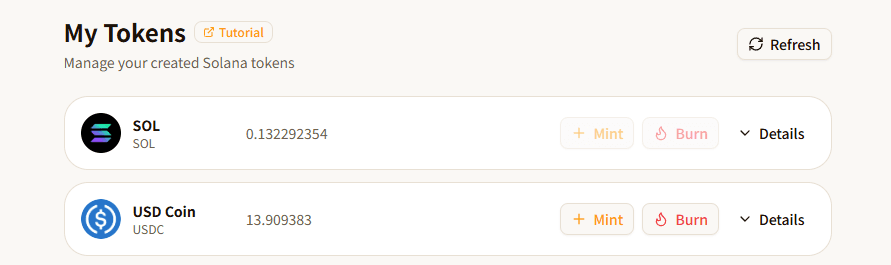
The "My Tokens" page displays all tokens held in your connected wallet and provides three core operations:
- Mint — Issue additional tokens to your wallet
- Burn — Permanently destroy a specified amount of tokens, reducing the total supply
- Revoke Authorities — Irreversibly relinquish mint, freeze, or metadata modification permissions
You can also view detailed token information including address, decimals, supply, and authority status.
📋 Prerequisites
- Connect Wallet: Click the "Connect Wallet" button in the top-right corner to connect your Solana wallet (supports Phantom, Solflare, OKX, etc.)
- SOL Balance: Ensure your wallet has a small amount of SOL to cover on-chain transaction fees
- Token Authority: Minting requires you to be the Mint Authority holder; revoking also requires you to be the holder of the corresponding authority
🚀 How to Use
Token List
After connecting your wallet, the page automatically loads all your tokens. Each token card displays:
| Info | Description |
|---|---|
| Token icon + name | The token's logo, name, and symbol |
| Balance | Amount of tokens held in your wallet |
| Mint button | Only available if you hold the Mint Authority |
| Burn button | Available for all tokens (except SOL) |
| Details button | Expand to view address, decimals, supply, and authorities |
Click the "Refresh" button in the top-right to manually reload the token list.
Minting Tokens
Available for tokens where you hold the Mint Authority.
Step 1: Open the Mint Dialog
Click the "Mint" button on the token card to open the mint dialog.
Step 2: Enter the Amount
Enter the amount of tokens to mint in the "Amount" input field. There's a quick-clear button (X icon) on the right side to clear the input instantly.
Step 3: Confirm
Click "Confirm" and your wallet will prompt you to sign the transaction. After signing, the tokens will be minted to your wallet address.
💡 There is no upper limit on minting, but be aware that minting dilutes token value. If your token has an active liquidity pool, large mints may cause price drops.
Burning Tokens
Destroy tokens you hold, permanently reducing the circulating supply.
Step 1: Open the Burn Dialog
Click the "Burn" button on the token card to open the burn dialog.
Step 2: Enter the Amount
Enter the amount of tokens to burn in the "Amount" input field. Your current balance is displayed below the input.
Quick Selection:
Below the balance, quick-select buttons are available:
- All — Fill in 100% of your balance
- 50% — Fill in 50% of your balance
- 10% — Fill in 10% of your balance
- Custom % — Enter any percentage (1~100) in the small input field on the right, and the corresponding amount is calculated automatically
The input field also has a quick-clear button on the right side.
Step 3: Confirm
Click "Confirm" and your wallet will prompt you to sign. After signing, the tokens are permanently destroyed.
⚠️ Burning is irreversible! Once tokens are destroyed, they cannot be recovered. Please double-check the amount before confirming.
Revoking Authorities
Irreversibly relinquish token management permissions, increasing the token's decentralization and community trust.
Step 1: Expand Token Details
Click the "Details" button on the right side of the token card to expand the detail panel.
Step 2: Review Authority Status
The detail panel shows three authorities:
| Authority | Description | Impact After Revocation |
|---|---|---|
| Mutable Metadata | Allows modifying token name, icon, and other metadata | Metadata is permanently locked and can never be modified |
| Mint Authority | Allows minting additional tokens | No more tokens can ever be minted; supply is fixed |
| Freeze Authority | Allows freezing/unfreezing any holder's token account | No accounts can ever be frozen |
Each authority card shows:
- Status badge: Active (green) or Revoked (gray)
- Authority holder address (abbreviated)
Step 3: Select Authorities to Revoke
Click the checkbox on the left side of each authority card to select the ones you want to revoke. You can select multiple — they will all be packed into a single transaction.
Step 4: Confirm Revocation
Click the "Revoke Selected" button. The system will:
- Verify that you are the holder of each selected authority
- Show a confirmation dialog displaying the number of authorities to be revoked
- After confirmation, your wallet will prompt you to sign
After signing, all selected authorities are permanently revoked.
⚠️ Revoking authorities is irreversible! Once revoked, the authority can never be restored. Please proceed with caution.
📊 Parameters
Mint Parameters
| Parameter | Description | Required | Constraints |
|---|---|---|---|
| Amount | Number of tokens to mint | Yes | Must be greater than 0 |
Burn Parameters
| Parameter | Description | Required | Constraints |
|---|---|---|---|
| Amount | Number of tokens to burn | Yes | Must be greater than 0, cannot exceed balance |
❓ FAQ
Q: Why is the "Mint" button grayed out?
A: The token's Mint Authority has been revoked, or you are not the authority holder. Once revoked, it cannot be restored.
Q: Can revoked authorities be restored?
A: No. Revoking authorities is an irreversible on-chain operation. No one (including FoxTool) can restore them.
Q: Why doesn't my token appear in the list?
A: Make sure you've connected the correct wallet and click "Refresh" to reload. If the token balance is 0 and you don't hold any authorities, it may not appear.
Q: Does revoking authorities affect token trading?
A: Revoking authorities does not affect normal transfers or trading. In fact, revoking mint and freeze authorities is considered a "safety" signal — many DEXs and analytics tools view it positively.
Q: Can I revoke all authorities at once?
A: Yes. Select all active authorities at the same time — they will be packed into one transaction and revoked together with a single signature.
⚠️ Important Notes
- Irreversibility: Both revoking authorities and burning tokens are irreversible operations. Please confirm carefully before proceeding
- Authority Verification: Only the authority holder (usually the token creator) can revoke the corresponding authority
- Gas Fees: Each operation requires a small amount of SOL for Solana network transaction fees
- Minting Risk: If your token is listed on exchanges or has liquidity pools, minting may cause price volatility
- Benefits of Revoking: Revoking Mint Authority signals a fixed supply; revoking Freeze Authority signals no one can freeze user assets — both increase community trust in the token