
Create & Buy
Create a token and complete the first buy in one click — supports creator self-buy and multi-wallet bundle buy
🔧 Feature Overview
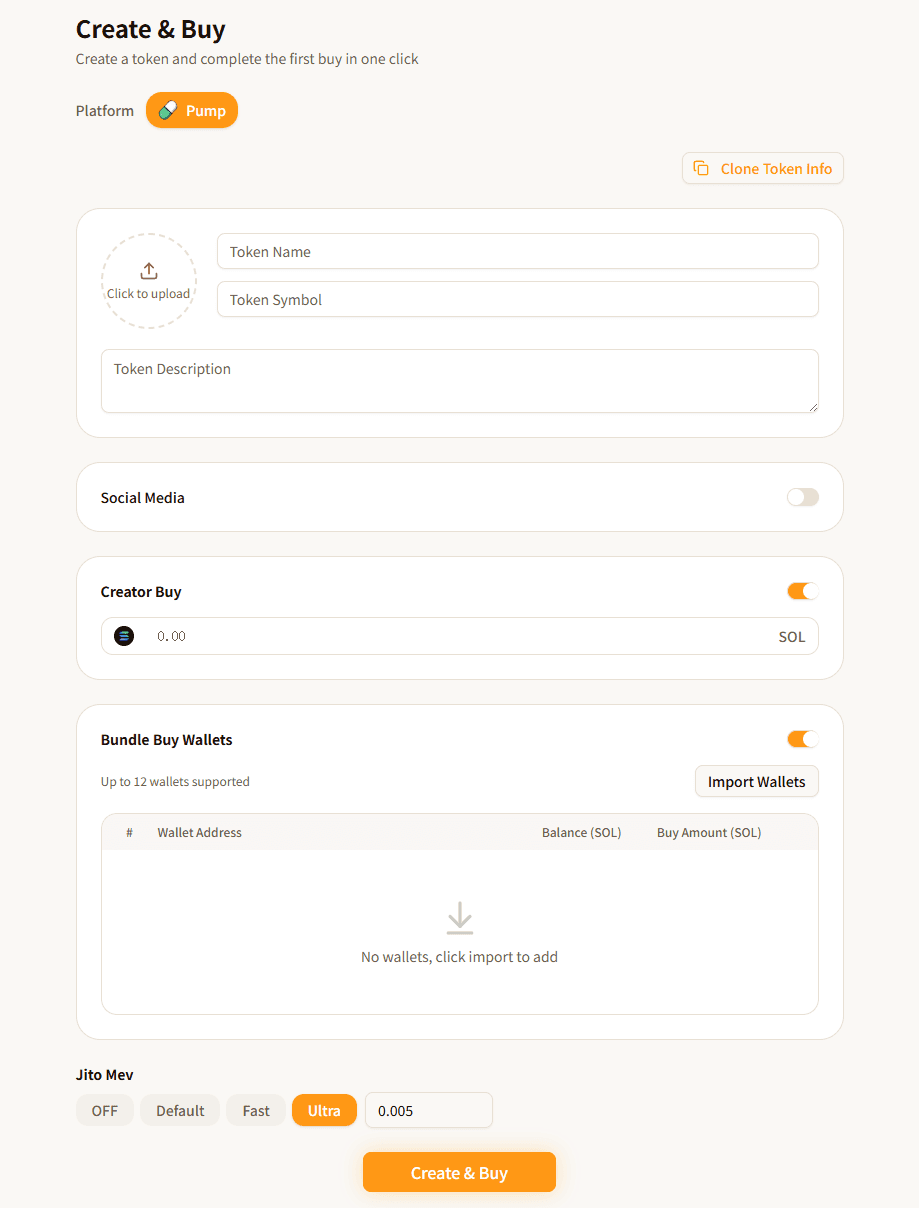
The "Create & Buy" feature allows you to create a token on Pump.fun and complete the first buy in a single operation. All transactions are sent via Jito Bundle, ensuring that creation and buying execute atomically in the same block, preventing front-running.
Core features:
- One-Click Creation — Complete token creation in one operation after filling in token info
- Creator Buy — Buy a specified amount with your connected wallet at the same time as token creation
- Multi-Wallet Bundle Buy — Import multiple wallets to buy simultaneously in the same block as creation
- Jito Bundle — All transactions are bundled via Jito, guaranteeing atomic execution
📋 Prerequisites
- Connect Wallet: Click the "Connect Wallet" button in the top-right corner to connect your Solana wallet (supports Phantom, Solflare, OKX, etc.)
- SOL Balance: Ensure your wallet has sufficient SOL for token creation fee + buy amount + Jito tip + network fees
- Buy Wallet Balance (for bundle buy): Ensure each imported buy wallet has sufficient SOL for purchasing
- Token Logo: Prepare a token logo image (required)
🚀 Instructions
Step 1: Select Platform
Select the token launch platform in the "Platform" section. Currently supported:
| Platform | Description |
|---|---|
| Pump.fun | The most popular Meme coin launch platform on Solana |
Step 2: Fill in Token Information
Fill in the token's basic information, same as creating a regular token:
| Field | Description | Required |
|---|---|---|
| Token Name | The full name of the token | Yes |
| Token Symbol | The abbreviated identifier (Ticker) | Yes |
| Token Description | A brief description of the token | No |
| Logo | Token icon image | Yes |
| Website | Project website link | No |
| Project Twitter/X link | No | |
| Telegram | Project Telegram link | No |
| Discord | Project Discord link | No |
💡 You can also click the "Clone Token" button in the top-right to enter an existing token's address and automatically copy its information (name, symbol, description, logo, etc.).
Step 3: Configure Creator Buy (Optional)
When the "Creator Buy" switch is enabled, your currently connected wallet will complete the first buy at the same time as token creation.
- Enter the buy amount in the input field (unit: SOL)
- This buy is bundled in the same Jito Bundle as the creation transaction, ensuring execution in the same block
💡 Creator buy helps you secure tokens at the very first moment of launch, without being front-run by others.
Step 4: Configure Bundle Buy Wallets (Optional)
When the "Bundle Buy Wallets" switch is enabled, you can import multiple wallets to buy simultaneously in the same block as creation.
Import Wallets:
- Click the "Import Wallets" button
- Paste wallet private keys in the dialog (supports multiple lines, one per line)
- Up to 12 wallets supported
Configure Buy Amounts:
The imported wallet list displays:
| Column | Description |
|---|---|
| # | Index number |
| Wallet Address | Abbreviated wallet address |
| Balance (SOL) | The wallet's SOL balance |
| Buy Amount (SOL) | Enter the buy amount for this wallet |
- Click "Fetch Balance" to refresh all wallet SOL balances
- Enter the buy amount (SOL) in the input field on each wallet row
- Wallets with 0 or empty buy amounts will not participate in buying
- Click the delete icon on the right side of a wallet row to remove it
- Click "Clear" to remove all wallets
Step 5: Set Jito MEV Tip
The Jito tip is required. A reasonable tip increases the probability that your Bundle will be prioritized by validators.
- Recommended: 0.005 SOL or higher
- A tip that's too low may result in the Bundle not being included (transaction failure)
Step 6: Execute Create & Buy
Click the "Create & Buy" button. The system will automatically execute the following process:
- Upload Metadata — Upload token info and logo to decentralized storage (Irys)
- Simulate Prices — Calculate expected token amounts for each buy based on Pump.fun's bonding curve
- Build Bundle — Package the creation transaction and all buy transactions together
- Request Signature — Wallet prompts for signature
- Send Jito Bundle — Send all signed transactions via Jito
- Complete — On success, displays the token address and transaction hash
⚠️ Do not close the page or switch wallets during the process. Wait for all steps to complete.
📊 Parameter Reference
| Parameter | Description | Required | Default |
|---|---|---|---|
| Platform | Token launch platform | Yes | Pump.fun |
| Token Name | Token Name | Yes | - |
| Token Symbol | Token Symbol | Yes | - |
| Logo | Token icon | Yes | - |
| Creator Buy | Whether to buy with connected wallet | No | Enabled |
| Buy Amount (Creator) | Creator's buy amount (SOL) | No | 0 |
| Bundle Buy Wallets | Whether to enable multi-wallet bundle buy | No | Enabled |
| Per-Wallet Buy Amount | Each wallet's buy amount (SOL) | No | - |
| Jito Tip | Jito MEV tip (SOL) | Yes | 0.005 |
❓ FAQ
Q: Why is Jito tip required?
A: The Create & Buy feature bundles multiple transactions into a Jito Bundle, which requires paying a tip to validators to ensure the Bundle is prioritized and included in the same block. Without a tip or with an insufficient tip, the transaction will fail.
Q: What requirements do bundle buy wallets need to meet?
A: Each buy wallet needs sufficient SOL balance to cover the buy amount and a small network fee. You need to provide the wallet's private key when importing.
Q: What's the difference between creator buy and bundle buy?
A: Creator buy uses your currently connected wallet to purchase, signed via wallet adapter. Bundle buy uses imported private key wallets to purchase, signed directly with private keys, allowing multiple wallets to buy concurrently.
Q: How many wallets can I use for bundle buy?
A: Up to 12 wallets are supported. Every 3 wallets are batched into one transaction, and all transactions are sent together via Jito Bundle.
Q: What if the transaction fails?
A: If the transaction fails, the token will not be created and all funds are returned as-is (Jito tip may not be refunded). Common reasons include: insufficient SOL balance, Jito tip too low, network congestion, etc. Check your balances and tip settings, then try again.
Q: What does the Clone Token feature do?
A: Clone Token allows you to enter an existing token's address to automatically copy that token's name, symbol, description, and logo image into the form, making it easy to quickly create a similar token.
⚠️ Important Notes
- Private Key Security: Bundle buy requires importing wallet private keys. Please operate in a secure environment. Private keys are only used locally in the browser and are never uploaded to any server
- Atomic Execution: All transactions are bundled via Jito — either all succeed or all fail. There won't be a situation where creation succeeds but buying fails
- Slippage Protection: The system automatically calculates maximum SOL cost and minimum token output based on the bonding curve, preventing excessive price deviation
- Jito Tip: The tip is an additional fee paid to validators. At least 0.005 SOL is recommended. During high network activity, you may need to increase it
- Balance Check: Before creating, ensure all participating wallets (both main wallet and buy wallets) have sufficient SOL balance
- Pump.fun Mechanism: Tokens are created on Pump.fun's bonding curve. Initial price is determined by platform global parameters, and subsequent buy/sell prices change along the curve