
Close Account
Batch close idle token accounts to reclaim rent SOL, with support for current wallet, private key, and batch modes
🔧 Overview

"Close Account" helps you clean up unused token accounts in your wallet and reclaim the full rent deposit in SOL.
On Solana, every token account requires a rent deposit of approximately 0.00204 SOL when created. When you no longer hold a particular token, that account becomes "idle" — the token balance is 0, but the rent remains locked. If your wallet has dozens or even hundreds of such idle accounts, the reclaimable SOL adds up significantly.
FoxTool provides three closing modes to suit different scenarios.
📋 Prerequisites
- Connect Wallet: Click the "Connect Wallet" button in the top-right corner to connect your Solana wallet (supports Phantom, Solflare, etc.)
- SOL Balance: Ensure your wallet has a small amount of SOL to cover transaction fees
- Review Accounts: We recommend browsing the account list first to confirm which accounts are truly no longer needed
🚀 Step-by-Step Guide
At the top of the page, you'll find three mode tabs: Current Wallet, Private Key, and Batch. Choose the mode that fits your use case.
Mode 1: Current Wallet
Best for cleaning up idle accounts in your currently connected wallet.
Step 1: View Account List
After connecting your wallet, the page automatically loads your token accounts, split into two sections:
- Idle Accounts — Accounts with a zero token balance that can be safely closed. These are auto-selected by default
- Accounts with Balance — Accounts still holding tokens. Closing these will first burn (destroy) the remaining balance
⚠️ Closing accounts with balance will permanently destroy the tokens inside. For valuable tokens like USDT or USDC, transfer them to another wallet first — do not close directly.
Step 2: Select Accounts to Close
- Idle accounts are selected by default; you can manually deselect any
- Accounts with balance are not selected by default; you need to manually check them
- Once accounts are selected, the reclaimable SOL amount is displayed in the top right
Step 3: Set Receiving Wallet
Choose where the reclaimed SOL should be sent:
- Current Wallet — SOL is returned to your currently connected wallet (default)
- Custom Wallet — Enter a specific wallet address to receive the reclaimed SOL
Step 4: Click "Close Accounts"
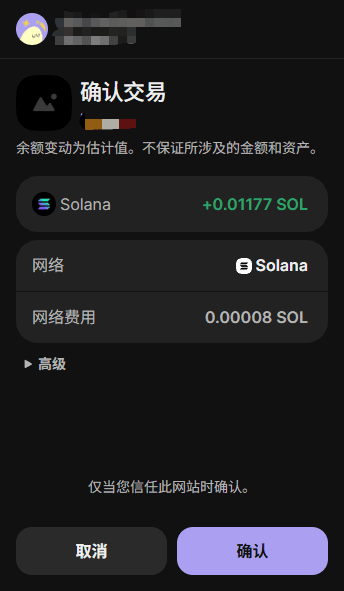
After confirming everything looks right, click the button. Your wallet will prompt for signature confirmation. The system packs multiple accounts into a single transaction (up to 6 per transaction). If there are many accounts, multiple transactions will be sent.
Mode 2: Private Key
Best for cleaning up accounts in wallets not connected through the wallet adapter.
Step 1: Enter Private Key
Paste the private key of the wallet you want to clean up. The system will automatically scan all token accounts under that wallet.
Step 2: Select Accounts and Close
The workflow is the same as "Current Wallet" mode, with an additional option:
- Gas Payer — Enable this to use a separate wallet's private key to pay transaction fees. Useful when the target wallet doesn't have enough SOL for fees
Mode 3: Batch
Best for cleaning up idle accounts across multiple wallets at once.
Step 1: Import Wallets
Click the "Import Wallet" button. In the dialog, enter multiple wallet private keys (one per line) and confirm the import. The system will scan each wallet's token accounts one by one.
Step 2: View Wallet List
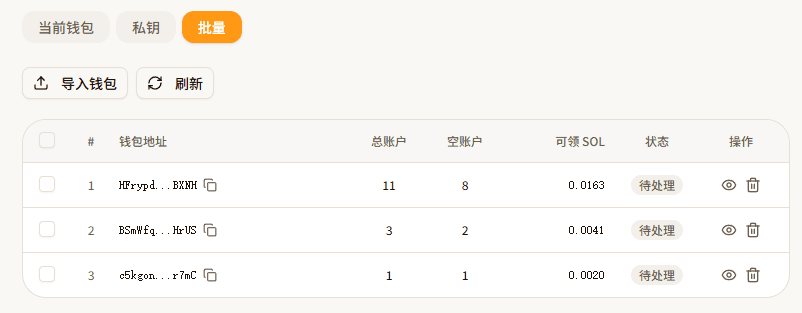
After importing, a wallet table appears with the following columns:
| Column | Description |
|---|---|
| Wallet Address | The imported wallet's public key |
| Total | Total number of token accounts in the wallet |
| Empty | Number of accounts with zero balance |
| Claimable SOL | Amount of SOL reclaimable by closing empty accounts |
| Status | Idle / Processing / Done / Error |
| Actions | View Details, Delete |
Step 3: Configure Options
- Gas Payer — Use a separate wallet to pay all transaction fees
- Receiving Address — Choose where reclaimed SOL goes:
- Specified Address — Enter a single address to receive all reclaimed SOL
- Original Address — SOL returns to each wallet's own address (default)
- Gas Payer Address — SOL is sent to the gas payer's wallet
- Quick Select — Choose what to close:
- Idle Accounts — Only close zero-balance accounts (safe, recommended)
- All Accounts — Close everything; accounts with balance will be burned first
⚠️ "All Accounts" mode will burn token balances before closing accounts. Make sure the tokens are truly worthless before proceeding.
Step 4: Select Wallets and Batch Close
Check the wallets you want to process and click "Batch Close." The system processes each wallet sequentially, with real-time status updates.
📊 Parameter Reference
| Parameter | Description | Available Modes |
|---|---|---|
| Receiving Wallet | Where reclaimed SOL is sent | Current Wallet / Private Key |
| Private Key | Private key of the wallet to clean up | Private Key / Batch |
| Gas Payer | Use a separate wallet to pay transaction fees | Private Key / Batch |
| Receiving Address | How SOL is received in batch mode | Batch |
| Quick Select | Close idle accounts only or all accounts | Batch |
💰 Fee Breakdown
- Reclaimed Amount: Each idle account recovers approximately 0.00204 SOL
- Platform Service Fee: A small platform fee per transaction
- Priority Fee: If priority fees are enabled in settings, an additional small SOL amount is charged
💡 Even after deducting fees, closing idle accounts is a net positive. The more accounts you close, the more SOL you recover.
❓ FAQ
Q: What is Solana account rent?
A: Every token account on Solana requires a rent deposit (~0.002 SOL) to store data on-chain. When you no longer need a token account, you can close it to reclaim the full rent deposit. If your wallet has many idle accounts, the reclaimable SOL can add up significantly — regular cleanup is recommended.
Q: What are idle accounts?
A: Idle accounts are token accounts with a zero balance. They no longer hold any tokens but still occupy on-chain storage and lock up rent SOL. Closing idle accounts is completely safe — no assets are lost, and you recover the rent deposit.
Q: What are accounts with balance?
A: These are token accounts that still hold tokens. Before closing such accounts, the remaining balance must be burned (destroyed). Make sure the tokens are truly no longer needed. For valuable tokens like stablecoins, transfer them to another wallet first rather than burning them.
Q: What does burning token balance mean?
A: Burning token balance permanently destroys the remaining tokens in an account, removing them from circulation. This is irreversible. It's a prerequisite for closing accounts with balance — only after the balance reaches zero can the account be closed and rent reclaimed. Always confirm the tokens have no value before burning.
Q: Can I recover a closed account?
A: No. Closing an account is irreversible. However, if you receive a transfer of the same token in the future, Solana will automatically create a new token account for you (requiring a new rent deposit).
⚠️ Important Notes
- Idle accounts are safe to close — Closing zero-balance accounts causes no asset loss
- Use caution with balance accounts — Remaining tokens will be burned (permanently destroyed) before closing. This is irreversible
- Stablecoin warning — The system shows a red warning when you select stablecoin accounts (USDT, USDC, etc.) with balance; these cannot be auto-burned
- Balance check — The system checks your wallet balance before proceeding and will warn you if funds are insufficient for gas fees
- Regular cleanup — We recommend periodically checking and closing idle accounts as good on-chain asset management practice